BorderLayout issue with JSplitPane after adding JToolbar (Java)
Problem:
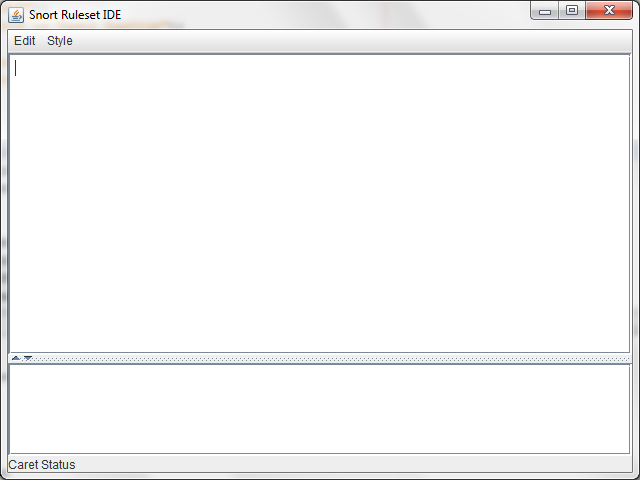
My program layout is ok as below before adding the JToolbar to BorderLayout.PAGE_START
Here's a screenshot added before adding the JToolbar:
This is how it looked after adding the JToolbar:
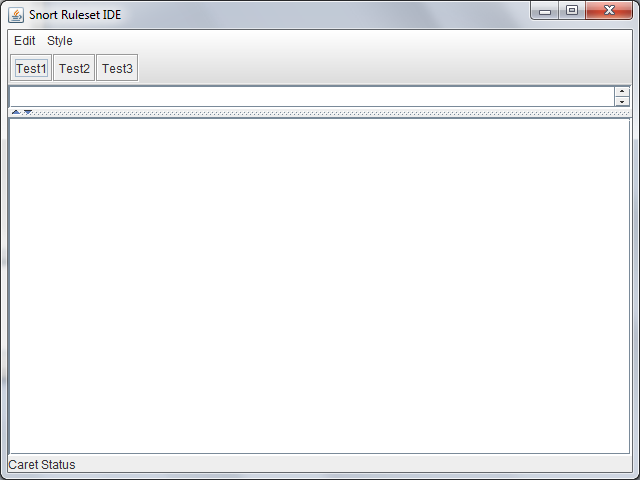
May I know what I did wrong?
Here is the code I used:
//Create the text pane and configure it.
textPane = new JTextPane();
-snipped code-
JScrollPane scrollPane = new JScrollPane(textPane);
scrollPane.setPreferredSize(new Dimension(300, 300));
//Create the text area for the status log and configure it.
changeLog = new JTextArea(5, 30);
changeLog.setEditable(false);
JScrollPane scrollPaneForLog = new JScrollPane(changeLog);
//Create a split pane for the change log and the text area.
JSplitPane splitPane = new JSplitPane(
JSplitPane.VERTICAL_SPLIT,
scrollPane, scrollPaneForLog);
splitPane.setOneTouchExpandable(true);
//Create the status area.
JPanel statusPane = new JPanel(new GridLayout(1, 1));
CaretListenerLabel caretListenerLabel =
new CaretListenerLabel("Caret Status");
statusPane.add(caretListenerLabel);
//Create the toolbar
JToolBar toolBar = new JToolBar();
-snipped code-
//Add the components.
getContentPane().add(toolBar, BorderLayout.PAGE_START);
getContentPane().add(splitPane, BorderLayout.CENTER);
getContentPane().add(statusPane, BorderLayout.PAGE_END);
//Set up the menu bar.
actions = createActionTable(textPane);
JMenu editMenu = createEditMenu();
JMenu styleMenu = createStyleMenu();
JMenuBar mb = new JMenuBar();
mb.add(editMenu);
mb.add(styleMenu);
setJMenuBar(mb);
Please help, I am new to GUI building and I dont want to use Netbeans to drag and drop UI for me ... Thanks in advance.
a source to share
Instead of using setSize()
in, JFrame
set the preferred size of your center component to the same as it is now, and call pack()
that "Makes this window sized to match the preferred sizes and layouts of its subcomponents." Expanding on @Bragaadeesh's example,
public static void main(String[] args) {
TestFrame frame = new TestFrame();
frame.setDefaultCloseOperation(JFrame.EXIT_ON_CLOSE);
frame.build();
frame.pack();
frame.setVisible(true);
}
Then change to scrollPane.setPreferredSize(new Dimension(500, 300))
or JTextArea changeLog = new JTextArea(10, 30)
to see the difference.
a source to share
I do not know what's the problem. I tried to run it on my system, fixing compilation issues. Here is the code and screenshot.

import java.awt.*;
import javax.swing.*;
public class TestFrame extends JFrame{
public static void main(String[] args) {
TestFrame frame = new TestFrame();
frame.build();
frame.setVisible(true);
}
public void build(){
setSize(600,600);
//Create the text pane and configure it.
JTextPane textPane = new JTextPane();
JScrollPane scrollPane = new JScrollPane(textPane);
scrollPane.setPreferredSize(new Dimension(300, 300));
//Create the text area for the status log and configure it.
JTextArea changeLog = new JTextArea(5, 30);
changeLog.setEditable(false);
JScrollPane scrollPaneForLog = new JScrollPane(changeLog);
//Create a split pane for the change log and the text area.
JSplitPane splitPane = new JSplitPane(
JSplitPane.VERTICAL_SPLIT,
scrollPane, scrollPaneForLog);
splitPane.setOneTouchExpandable(true);
//Create the status area.
JPanel statusPane = new JPanel(new GridLayout(1, 1));
JLabel caretListenerLabel =
new JLabel("Caret Status");
statusPane.add(caretListenerLabel);
//Create the toolbar
JToolBar toolBar = new JToolBar();
toolBar.add(new JButton("Btn1"));
toolBar.add(new JButton("Btn2"));
toolBar.add(new JButton("Btn3"));
toolBar.add(new JButton("Btn4"));
//Add the components.
getContentPane().add(toolBar, BorderLayout.PAGE_START);
getContentPane().add(splitPane, BorderLayout.CENTER);
getContentPane().add(statusPane, BorderLayout.PAGE_END);
//Set up the menu bar.
JMenu editMenu = new JMenu("test");
JMenu styleMenu = new JMenu("test");
JMenuBar mb = new JMenuBar();
mb.add(editMenu);
mb.add(styleMenu);
setJMenuBar(mb);
}
}
a source to share
EDIT: I understand why now.
I used Paint to give me a rough estimate of the pixels and I didn't know before that the height is calculated from the start of the top frame's title bar! So this is ~ 504. I am getting it now.
So, next time I need to set the height roughly, I think I will use Paint.
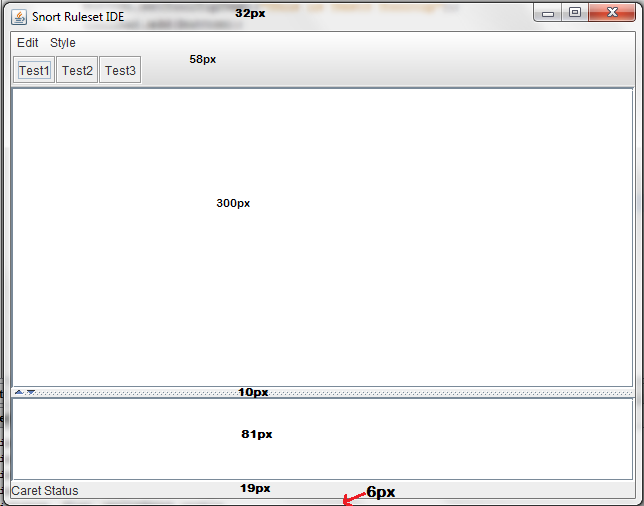
A bit weird. I need to change:
//Display the window.
frame.setSize(640, 480);
to
//Display the window.
frame.setSize(640, 504);
Then only he works.
Can someone teach me how to estimate or set width / height for components? Because initially I wanted him to be 640,480
, but, apparently, now he needs 640,504
.
a source to share